


Memory Stockphoto // Shutterstock
9 signs your auto shop has outgrown spreadsheets
Excel was released in 1985. Forty-one years later, here you are, still using it to run your shop. Spreadsheets are wonderful. Your schedule is on there. Your techs’ repair orders (RO) and updates for the day are found on it. Your service advisors use it to track customers. It’s going well, until it isn’t.
It’s 7:45 a.m. You’ve got two cars scheduled for bay 2, a customer standing at the counter asking where his Impala is, a tech wondering what the first repair of the day is, and a sticky note from yesterday with a callback number about a brake job that’s suspiciously missing. By the time everything is sorted out, you’re already behind.
The problem isn’t with the spreadsheet, the whiteboard, the sticky notes or even the paper. These work just fine when you’re doing five cars a week. It stops working the day yesterday becomes a blur, and your spreadsheet isn’t helping either. The thing is, you don’t usually notice until the end of the month, when you’ve already lost money and customers.
So, how do you know it’s time to switch to something better, like auto repair shop management software? Way.com shares nine signs to keep an eye out for.
Sign 1: You’re double-booking bays or missing appointments
Your service advisor is going through your spreadsheet and sees that a quick repair is scheduled for 2 p.m., an hour from now. They assign a junior tech to it and move on. Now, it’s 2 p.m. and two of your techs are booked for the same bay. The service advisor is baffled because they’re sure they only scheduled one tech.
Another day, another issue. A customer who had called earlier about replacing the timing chain arrives. But you had nothing written in your spreadsheet, so your techs don’t have the capacity to take it on. There goes another customer out the door.
Shop management software solves this by tying scheduling directly to bay and technician availability in real time. Double-booking becomes much harder, not just something you have to remember to avoid. Appointments are automatically displayed in the system’s calendar, so you don’t have to worry about missing them.
Sign 2: You can’t answer “Where’s that car?” without walking the floor
Your service advisor is looking at the spreadsheet, updating the status of the cars. Except she can’t tell which cars are in which bays. She has to walk out to the shop floor and write it down manually. An hour later, she’s back to check again. Before noon, she has walked out to the shop floor five times.
This can be avoided with automated status updates. Your service advisors get notifications every time a car moves to the next stage, so they know exactly where each car is in the shop.
Sign 3: Inventory runs out mid-job
Your tech just finished his diagnosis on a Toyota. He checks the spreadsheet to make sure the parts required for the job are available. He starts the repair and reaches for an alternator from the shelf, only to realize it’s not there.
It’s easy for a manual inventory tracker to be out of sync, especially with multiple techs pulling parts throughout the day. With shop management software, you get real-time inventory status and notifications of which parts are running low. You can also create a purchase order right then and there, instead of scrambling to place an order across town mid-repair.
Sign 4: Customers call to ask for updates you don’t have
A customer calls for an update on the Camry. Your service advisor has to walk to the bay, find the car, interrupt a tech mid-repair, and write down the status in their notebook. Multiply that by a dozen calls a day, and it adds up to a lot of laps walked around the shop floor.
A shop management system tracks each vehicle’s status: what time it was brought in, which bay it is in, the diagnosis, the parts yet to be delivered, who’s working on it, and how long it will take. Everyone has access to the same information, so your service advisors can answer your customers’ questions without leaving their desks.
Sign 5: Estimates take longer than the actual repair
A customer just brought in their car for a windshield replacement. Your service advisor is digging through old invoices, calling a parts supplier, manually calculating labor time, and inspecting for hidden damages to write the estimate. The advisor is spending more time quoting the job than a tech spends doing it.
During this delay, your customer will start comparing your shop to your competitors, which could lead them to walk out before they even receive the estimate.
Shop management software has built-in labor guides and parts catalogs, so your service advisors only need minutes to create an estimate. You can also send the quote directly to the customer via SMS or email. You’re more likely to get a “yes” than if you send an estimate a couple of hours later.
Sign 6: You have no idea which services are actually profitable
Your shop has developed a list of services that you’re confident in. Your spreadsheet holds the numbers, but you have no idea which services are the money-makers, nor do you have the time to go through them. You may think brake jobs are the winners, when seasonal check-ups are what’s more profitable.
Reporting solves this problem. You get real-time reports based on revenue, job analytics, tech efficiency, and RO conversions. This lets you see which jobs are worth chasing and which are costing you money.
Sign 7: Payroll and invoicing eat your Sunday
It’s 10 p.m. on a weekend, and you’re sitting in front of the spreadsheet, manually reconciling timecards, matching invoices to payments, and double-checking totals that you’ve been working on for hours.
Integrated invoicing and payroll tools pull directly from the work orders and time tracking that are already in the system, so the reconciliation is mostly done by the time Sunday rolls around.
Sign 8: You’re losing repeat customers, and you don’t know why
Robert has been coming to your shop for a while now. But one day, he stopped, and you don’t know why. Without a system to track who’s due for what, it’s easy to lose customers who have become familiar faces.
Shop management software triggers reminders and follow-ups to help you send out timely texts or emails that keep your shop in mind. It can be as simple as sending, “Hey Robert, it’s been a while since your last oil change. Visit us this week, and we’ll throw in a free tire check.”
Sign 9: You’re turning away work because you’re at capacity
Business is doing well, but at the end of a particular month, you notice you’re saying no more often. Recently, you had to turn down a walk-in on Tuesday because every bay was booked according to your spreadsheet. When you look later, you notice Friday had an open bay. If you’re at capacity and turning work away with no visibility into which days or techs actually have room, you might be leaving money on the table even during your busiest weeks.
A system that shows real capacity across your bays and techs makes it possible to route overflow work to the right day or tech instead of defaulting to “Sorry, unfortunately, we’re full. Could you come back another day?”
Quick recap: Spreadsheet vs repair shop management software
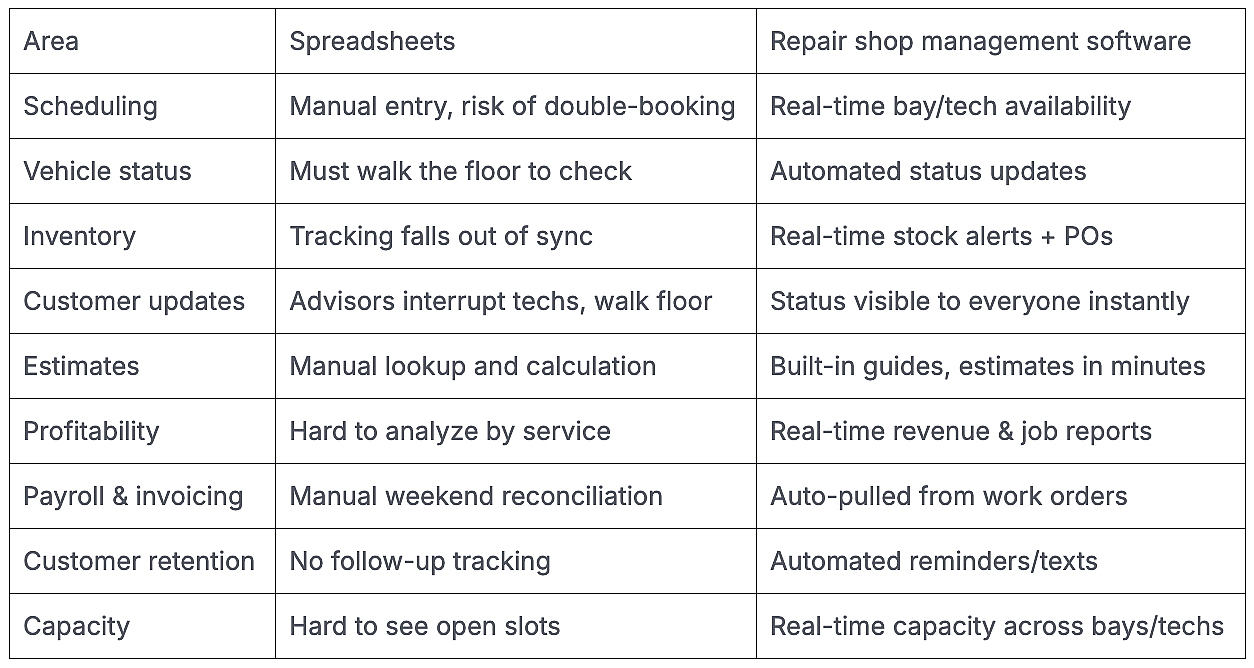
Way.com
What to do next
If at least one of the signs applies to you, you’ve probably outgrown spreadsheets. Maybe you haven’t had a reason to switch to software yet. Most shops don’t move on to a shop management system after a single chaotic day; they move when the bad days pile up.
Here’s what the implementation might look like:
- Your existing spreadsheets are migrated to the software.
- A trial run is conducted to check what’s working and what isn’t.
- A shop-wide implementation takes place.
Depending on which solution you choose, you can generally complete the migration in about 12 to 15 days, so you can start using the system without losing weeks to the transition. Keep in mind that it might take you and your team a week or two to get used to the new system. Training and daily huddles can help make it easier.
This story was produced by Way.com and reviewed and distributed by Stacker.